In the digital era, turning images into documents is a regular task. Whether it’s scanning receipts, submitting schoolwork, or sharing official papers, the need to convert photo to PDF online free is common. Thankfully, Photogen’s photo to PDF converter makes this process simple, fast, and free—no watermark, no sign-up, and fully browser-based.
This article will guide you through everything you need to know about how to convert photo to PDF online free, why it matters, and the best tools to use today.
✅ Why Convert Photo to PDF Online Free?
There are several strong reasons people search for photo to PDF online free tools regularly:
- Universal Format: PDFs are readable on all devices, operating systems, and browsers.
- Professional Output: PDFs make your image-based content look formal and neat.
- Easy Sharing & Archiving: Combine multiple images into a single compact document.
- Better Security: PDFs can be password-protected, unlike image files.
If you’re dealing with academic documents, legal photos, scanned IDs, or handwritten notes, converting photo to PDF online free with Photogen is the most efficient solution.
Not all online tools are equal. If you’re searching for the best way to convert photo to PDF online free, make sure the tool offers:
- No Watermarks
- Multiple Image Format Support (JPG, PNG, BMP, GIF)
- Batch Image Upload
- Page Customization (A4, Letter, Orientation, Margin)
- Fast & Secure Conversion
- Mobile Friendly
The Photogen Tools Library offers a range of free tools, including a powerful photo to PDF online free converter that checks all the boxes.
📷 Photogen: The Best Way to Convert Photo to PDF Online Free
Photogen is a growing platform focused on simple, secure, and free online utilities. Its photo to PDF online free tool stands out for being:
- User-Friendly: No signup required
- Fast: Conversion takes seconds
- Clean Output: No logos or branding added
- Privacy-First: Files are deleted automatically for your security
Try it here ➜ Photogen Photo to PDF Online Free

📄 How to Convert Photo to PDF Online Free with Photogen
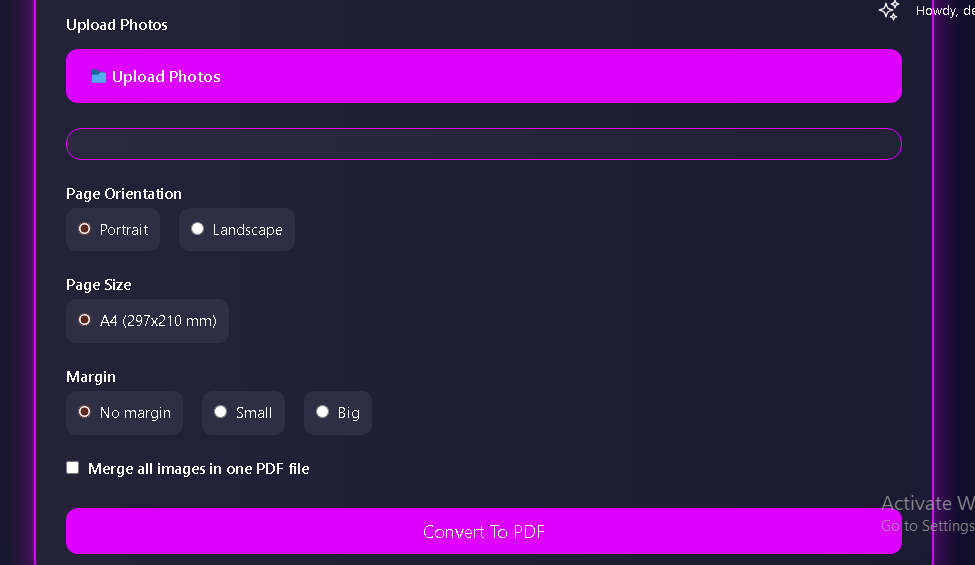
Here’s a quick step-by-step on how to use the photo to PDF online free tool on Photogen:
Step 1: Visit the Tool
Go to https://photogen.in/photo-to-pdf-online-free/
Step 2: Upload Your Photo(s)
Click “Choose Images” or drag and drop your files into the upload area.
Step 3: Adjust Settings (Optional)
- Arrange photo order
- Set page size (A4, Letter, etc.)
- Select Portrait or Landscape orientation
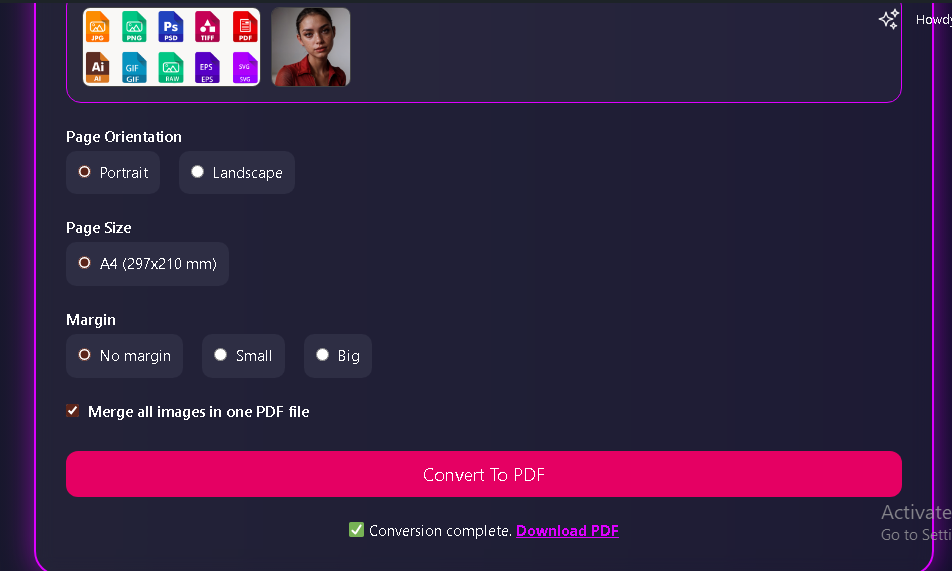
Step 4: Click “Convert to PDF”
The tool will process and download your file instantly. No waiting, no watermarks.
📱 Convert Photo to PDF Online Free on Mobile
Need to convert images to PDF from your phone? Photogen’s photo to PDF online free tool is fully responsive and mobile-friendly. Whether you’re using Android or iOS, just visit https://photogen.in/photo-to-pdf-online-free/ on your mobile browser.
You can upload photos directly from your phone’s gallery and generate a PDF with just a few taps.
Security is crucial when handling personal documents or photos. That’s why Photogen guarantees:
- End-to-End SSL Encryption
- Auto File Deletion After Use
- No Data Storage or Tracking
Your data is never shared, stored, or reused. The photo to PDF online free feature respects your privacy and ensures that all files are removed after processing.
🛠️ Additional Free Tools on Photogen
Beyond photo to PDF online free, Photogen’s Tools section also offers:
- PDF to JPG
- Image Compressor
- Crop Image
- Merge PDFs
This makes Photogen a one-stop-shop for everyday document and image editing tasks.
Explore all tools here ➜ https://photogen.in/tools/
💡 Pro Tips for Better Photo to PDF Conversions
To get professional-quality output when using photo to PDF online free, follow these tips:
- Use high-resolution images for clarity
- Rename image files in order (e.g., img1, img2, etc.)
- Keep background lighting even when scanning or photographing documents
- Choose appropriate page size and orientation for better layout
Photogen’s tool is designed to help you make these adjustments before converting your photo to PDF online free.
🧾 Use Cases for Photo to PDF Online Free
Here are just a few real-world scenarios where photo to PDF online free is helpful:
- Students: Submitting handwritten homework or notes
- Job Seekers: Sending documents or certificates in one PDF
- Freelancers: Invoicing with signature images
- Business Owners: Sharing product photos as catalogs
- Travelers: Scanning travel documents or receipts
No matter the use case, Photogen’s photo to PDF converter offers a hassle-free experience
🚀 Why Choose Photogen to Convert Photo to PDF Online Free?
Let’s sum it up:
✅ 100% Free
✅ No Watermarks
✅ Fast & Reliable
✅ Mobile-Friendly
✅ Private & Secure
✅ Easy for Everyone
Photogen provides a clean, no-nonsense interface focused entirely on helping you convert photo to PDF online free—without the spammy ads or pop-ups.
🌐 Start Using Photo to PDF Online Free Today
You don’t need to download an app, sign up, or waste time with trial software. Just visit https://photogen.in/photo-to-pdf-online-free/, upload your image, and download your PDF in seconds.
Still exploring? Check out all the helpful tools Photogen offers ➜ https://photogen.in/tools/
📝 Final Thoughts
The ability to convert photo to PDF online free is more important than ever. Whether you’re organizing personal files, managing work tasks, or submitting important documents, Photogen gives you the tools you need—fast, free, and secure.
👉 Ready to try it? Head to Photogen’s Photo to PDF Tool and get started instantly.